

Put a site online by talking to Claude
Kivala Cloud is a connector for Claude. Once added, it lets Claude send the site it built with you and give you back a public address, with the padlock.
https://mcp.kivalacloud.com/mcpFree during the test phase. Read the setup guide
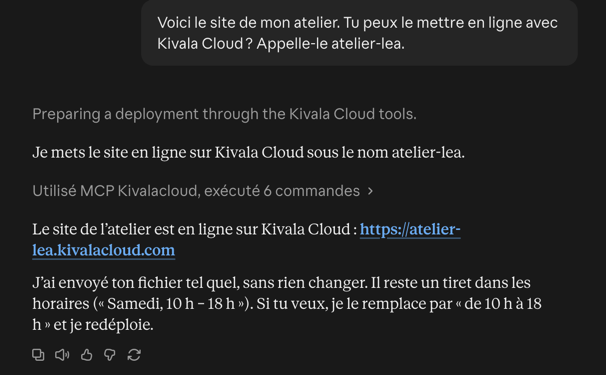
The full conversation
We invented Léa, a ceramicist in Lyon, and built her a one-page site. Then we gave the file to Claude. One sentence was enough.
It replied with the address atelier-lea.kivalacloud.com, and it even offered to fix a stray dash in the opening hours, which nobody had asked it to do.
The visual at the top of the page is a screenshot of a real conversation on claude.ai, with no change to the text.
What you can ask next
Once the site is online, you keep talking to Claude as usual. Here are three requests, and what happens behind them.
Edit the site
“Change the price of the bowls to €28.”
Claude edits the site and puts it back online at the same address. The new version must first respond properly; if it fails, the address goes back to the previous one, which has not been stopped in the meantime.
Change the price of the bowls to €28.
I’m changing the price of the bowls and putting the site back online.
Used MCP Kivalacloud, ran 2 commands
The bowls are now €28. The site is updated, at the same address: https://atelier-lea.kivalacloud.com
Add a key
“My app needs my key.”
Claude gives you a link to a separate page, valid for thirty minutes. You enter the key yourself. Claude is instructed never to ask you for it in the conversation, and the page does not show it to Claude.
Delete the site
“Delete my site.”
Claude first shows you what will disappear. Nothing is erased until you have confirmed the exact name of the site. The address is then cut right away.
Delete the site atelier-lea
Used MCP Kivalacloud, ran 1 command
Nothing has been deleted yet. Deleting the site atelier-lea will cut its address immediately and erase the site. This is permanent.
To confirm, I need the exact name of the site.
atelier-lea
Used MCP Kivalacloud, ran 1 command
The site atelier-lea is deleted. Its address no longer responds.
Signing in to your account
No password to create. The first time Claude uses Kivala Cloud, a page opens in your browser.
- 1
Your email. You enter it, then ask for a code.
- 2
The six-digit code. It arrives by email, works once and expires after ten minutes.
- 3
The authorization. The page shows you what Claude will be able to do on your behalf. You choose Authorize or Refuse.
What's included
In every plan, and from the test phase. Nothing for you to configure.
An HTTPS address
Each site gets its own address with the padlock. There's no certificate for you to manage.
Updates through the conversation
To change a price, tell Claude. It puts the site back online at the same address.
Protected secrets
Your keys are entered on a separate page and stay encrypted. They never go through the conversation.
Logs read by Claude
If a page stops loading, it reads what your site has recorded and explains the error without jargon.
Errors explained
When a deployment fails, the error goes back to Claude, who shows it to you in plain terms and often suggests a fix.
Deletion in one sentence
Write “delete my site”. Nothing is erased before you have confirmed the exact name.
Supported projects
No need to know which box yours falls into: Kivala Cloud recognizes the type of project when Claude sends it, and prepares what it needs to run.
| Type | What Claude must find in the folder | What it covers |
|---|---|---|
| HTML | An index.html file, at the root or in a folder such as public or dist | A site of one or more pages, with its images and stylesheets. |
| Node.js and Next.js | A package.json file | JavaScript applications, including those built with React, Vite or Vue. |
| Python | A requirements.txt or pyproject.toml file | FastAPI, Flask, Django or Streamlit applications. |
| PHP | An index.php or composer.json file | Sites and small applications written in PHP. |
| Dockerfile | A Dockerfile at the root of the project | Any project that ships with a Dockerfile, whatever its language. |
If several of these files are present, the Dockerfile comes first. The detail type by type, in the documentation
Security
Every upload is scanned by an antivirus before it goes online. Your site runs separately from other users' sites, and your keys are stored encrypted.
What isn't in place yet
Kivala Cloud has no security certification, neither ISO 27001 nor SOC 2.
No backup of your sites is promised during the test. Keep a copy of your project.
Custom domain names aren't offered yet.
Add Kivala Cloud to Claude
https://mcp.kivalacloud.com/mcpFree during the test phase. Read the setup guide